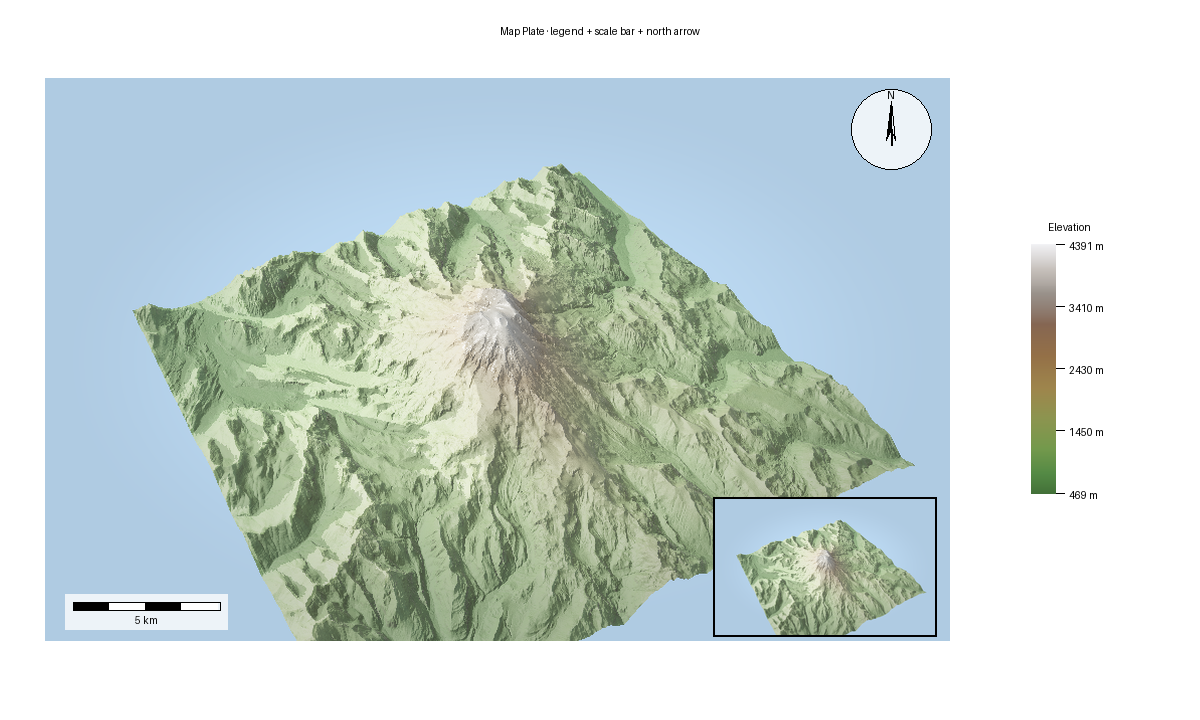
Build A Map Plate
Pro Feature: This tutorial uses features that require a commercial license. See https://github.com/milos-agathon/forge3d#license. You can read and learn from the code, but the highlighted functions will raise
LicenseErrorwithout a valid key.
MapPlate is the composition layer above the live viewer. It takes an RGBA map
image and adds cartographic furniture such as a title, legend, scale bar, north
arrow, and insets. The expected output below is the gallery render produced by
scripts/regenerate_gallery.py.
This example keeps the source image on the main viewer path by taking a snapshot first, then composing the plate from that RGBA output.
Compose a plate
from pathlib import Path

import numpy as np
from PIL import Image

import forge3d as f3d

dem_path = f3d.fetch_dem("rainier")
snapshot_path = Path("plate-source.png")

with f3d.open_viewer_async(
    terrain_path=dem_path,
    width=900,
    height=560,
) as viewer:
    viewer.set_z_scale(0.1)
    viewer.set_orbit_camera(phi_deg=28, theta_deg=49, radius=5400, fov_deg=42)
    viewer.set_sun(azimuth_deg=315, elevation_deg=30)
    viewer.snapshot(snapshot_path, width=900, height=560)

map_rgba = np.asarray(Image.open(snapshot_path).convert("RGBA"), dtype=np.uint8)

bbox = f3d.BBox(west=-122.0, south=46.7, east=-121.6, north=46.95)
domain = (0.0, 4000.0)

legend = f3d.Legend.from_colormap(
    f3d.get_colormap("terrain"),
    domain=domain,
    config=f3d.LegendConfig(title="Elevation", label_suffix=" m"),
)

meters_per_pixel = f3d.ScaleBar.compute_meters_per_pixel(bbox, image_width=map_rgba.shape[1])
scale_bar = f3d.ScaleBar(meters_per_pixel, config=f3d.ScaleBarConfig(units="km"))
north_arrow = f3d.NorthArrow(f3d.NorthArrowConfig(style="compass", size=72))

plate = f3d.MapPlate(f3d.MapPlateConfig(width=1600, height=1000))
plate.set_map_region(map_rgba, bbox)
plate.add_title("Mini DEM Plate", font_size=28)
plate.add_legend(legend.render())
plate.add_scale_bar(scale_bar.render())
plate.add_north_arrow(north_arrow.render())
plate.export_png("map-plate.png")
Gallery-backed script
The published map plate comes from render_10_map_plate() inside
scripts/regenerate_gallery.py. That flow first calls
examples/terrain_viewer_interactive.py to render the base terrain image, then
composes the plate in Python with MapPlate, Legend, ScaleBar, and
NorthArrow.
Notes
MapPlateworks with any RGBA image, including viewer snapshots.Legend,ScaleBar, andNorthArroware separate renderers so you can customize them independently.For real-world products, use the actual map bounds and image width when computing
meters_per_pixel.If you want the exact published output, compare against Map Plate.
Next: 3D Buildings
Expected output